
Psiphon is an open internet for all; then why do you need a proxy for Psiphon?
Even though Psiphon lets you access websites without restriction, you never know when your IP gets blocked. This is where you can add a free Psiphon proxy or buy a premium one for enhanced security.
In this guide, we’ll uncover which Psiphon proxy works and how to configure it properly.
Table of Contents
What Is Psiphon?
Psiphon is an alternative to Chrome, Firefox, Brave, and antidetect browsers that help users access websites that ISPs, governments, workplaces, etc might restrict.
| Developed In: | Toronto, Canada |
| Devices Supported: | Android, Windows, iOS, and Mac |
| Number of downloads: | 150,000,000+ |
| Perks: | Open Source, Psiphon Data Engine, PsiCash |
| Supported server regions: | 17 server locations including the US, India, Japan, etc. |
| Languages Supported: | 40+ languages including Hindi, Farsi, etc. |
| Website: | https://psiphon.ca/ |
Is “Proxy for Psiphon” Real?
Proxy for Psiphon refers to two different things:
- Integrating any proxy server provider with Psiphon.
- Using Psiphon’s built-in proxy infrastructure to access restricted websites (which is nothing but a VPN).
In this article, we will cover the steps to configure a Psiphon proxy (HTTP, HTTPS, or SOCKS5).
This will help you access websites, online games, and social media platforms in case Psiphon’s secure tunnel is blocked.
Why Use a Proxy with Psiphon?
1. Bypass Internet Restrictions
By using a proxy with Psiphon, you are doubling up the security level. Thus, when organizations and ISPs block VPN, a Psiphon proxy establishes a secure connection.
2. Improve Speed and Stability
Certain sites like gaming require a stable connection and high speed. When routing traffic via a residential proxy for Psiphon for free, you get a reliable connection and optimum speed.
3. Access Region-Specific Content
Sitting in India and expecting to use CapCut for free isn’t possible without a VPN or a high-speed proxy for CapCut.
What Proxy Types Are Supported By Psiphon?
Psiphon typically supports:
- HTTP Proxy
- HTTPS Proxy
- SOCKS5 Proxy
SOCKS5 proxy provides better performance, speed, and stability for applications beyond standard web browsing.
Does Psiphon support MTProto proxies?
No, MTProto proxies are specially made for Telegram and cannot be used on any other platforms.
How to Configure a Proxy in Psiphon?
➡️ Step 1: Visit the Psiphon website and download Psiphon for Windows or Mobile.
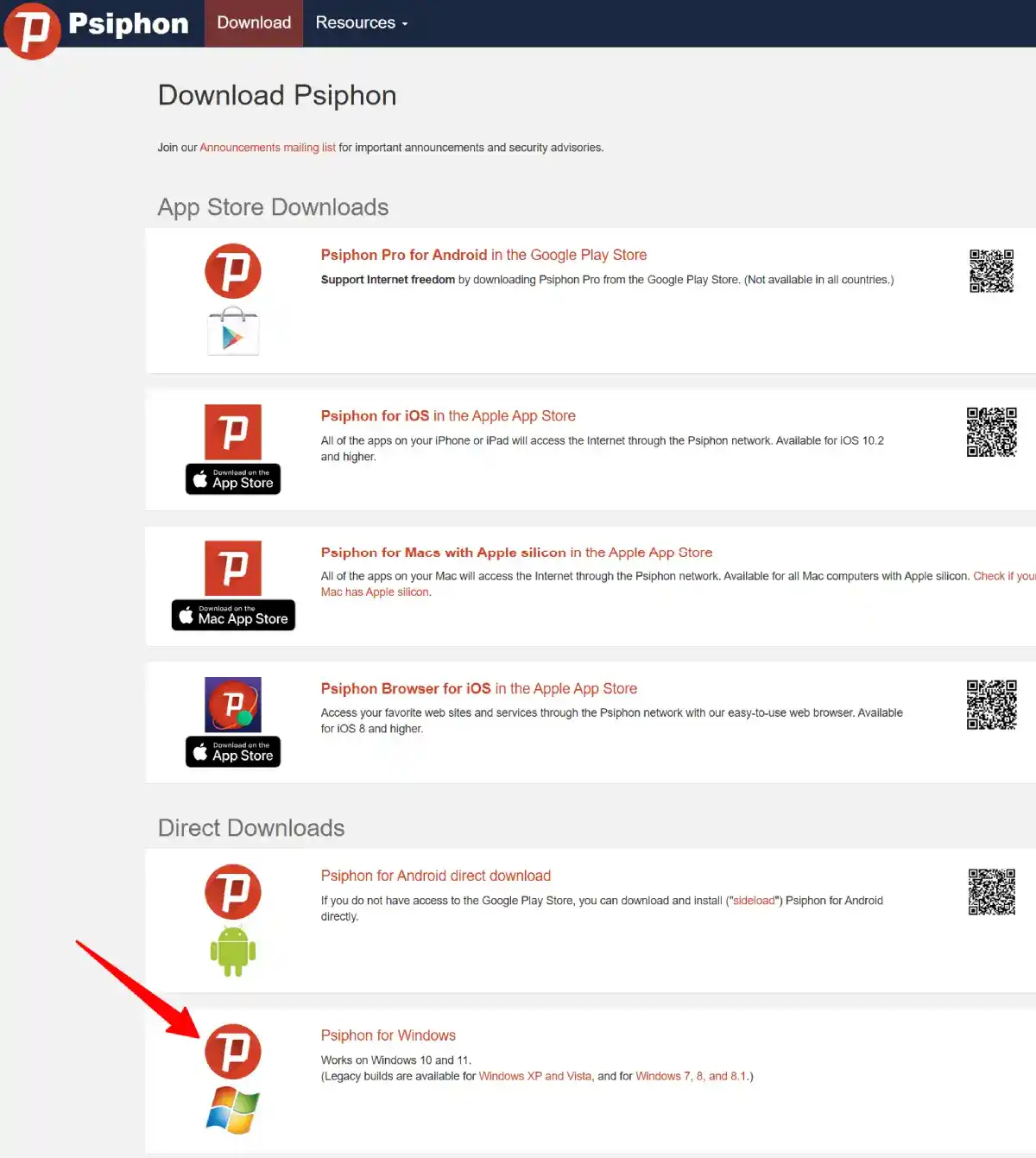
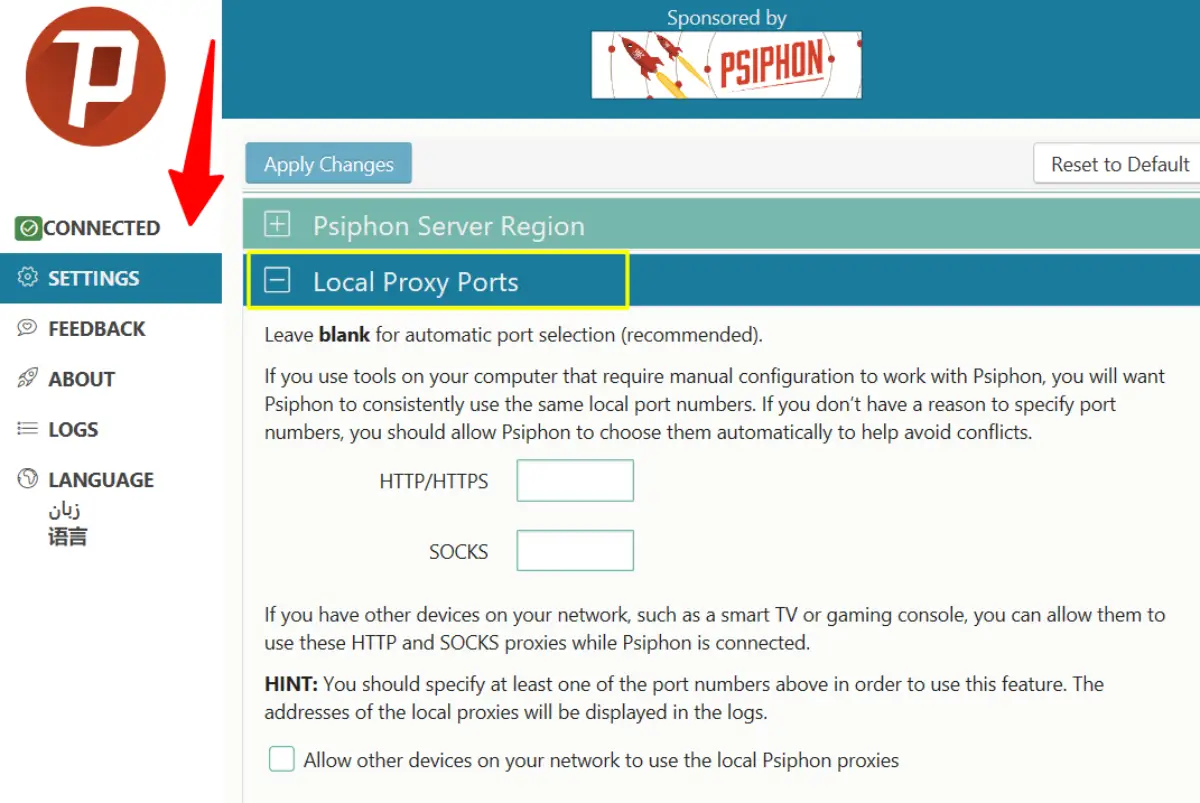
➡️ Step 2: There is no installation required. Simply open the Psiphon app and go to the Settings tab on the left side. Click on Settings, and you will see multiple options.
For proxy settings, you can choose either Local proxy ports or Upstream Proxy.
Option 1: The local proxy ports option is used to configure Psiphon with other tools and devices such as a smart TV or gaming console. To configure the device manually with Psiphon, enter the port number.
Option 2: Psiphon establishes a proxy connection by default if already configured in your system. You can override this by using an upstream proxy for Psiphon, which is sometimes required by organizations and businesses.
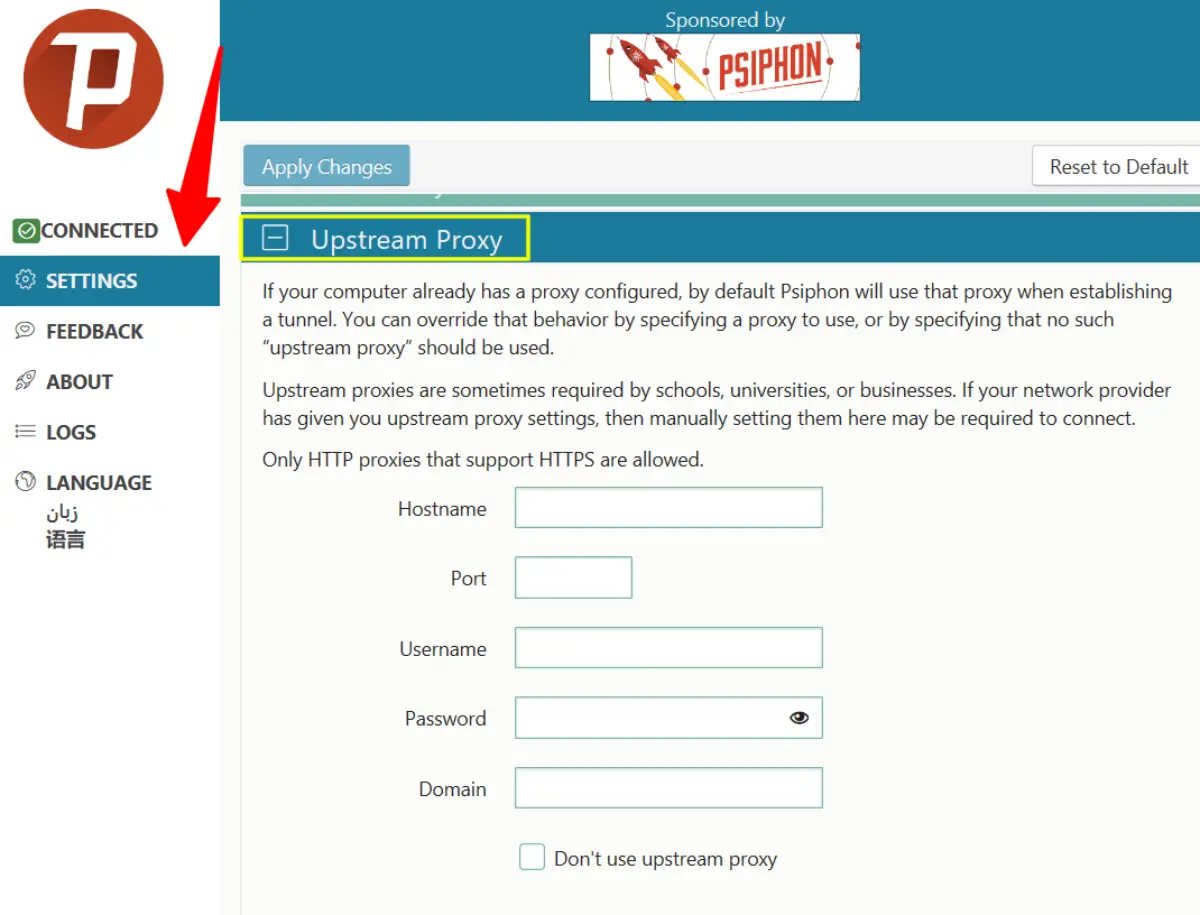
➡️ Step 3: Click on Apply Changes whenever you enter the proxy details.
If you have entered correct proxy details, Psiphon will establish the connection via the configured proxy server.
Common Queries Related to Psiphon Proxy
Does Psiphon require installation?
No, you can simply download the Windows application and start using Psiphon for free.
How to connect to the internet using Psiphon?
Select a server region just like you do in a VPN, and click on Connect. A new window of Hosted Conduit will open. Log in using your Gmail account to monitor, configure, and share the conduit with different devices.
Does Psiphon support China server location?
No, to connect to Chinese websites, you can use a Psiphon proxy server. If you want to use CapCut, look out for high-speed CapCut proxies.
What if I don’t want to connect to the internet via Psiphon?
Go to the settings and enable the Split Tunnel option. This will let you access websites in your country faster.
Will I get traffic alerts?
Yes, by default, Psiphon sends traffic alerts for some traffic that is disallowed. You can disable the disallowed traffic alerts in the settings.
Psiphon Proxy vs VPN
| Feature | VPN | Psiphon Proxy |
| Encrypts Traffic | ✅ Yes | ✅ Yes |
| Bypasses Censorship | Moderate | Excellent |
| Easy Setup | Requires external VPN setup | Built-in proxy configuration settings. |
| Works Against Advanced Filtering | Moderate | Strong |
| Supports Multiple Protocols | ❌ No | ✅ Yes (HTTPS, SOCKS5) |
Winner: Psiphon proxy is a clear winner as it can switch between its built-in VPN and external proxy services.
What Factors To Consider Before Using a Proxy For Psiphon?
Before using a proxy with Psiphon, consider the following:
- Avoid using free proxy IPs from unknown proxy providers.
- Use residential proxy IPs for the US or other countries depending on your budget.
- Compare pricing and know the difference between HTTP and SOCKS proxies.
Conclusion
Using proxies for Psiphon can improve reliability and reduce the chances of getting banned by some sites. However, for general use, Psiphon’s built-in VPN is sufficient to access websites in other countries and requires no manual configuration.
When using an external proxy, choose a reputable proxy provider and test multiple locations with the free trial.
FAQs | A Guide To Proxy For Psiphon
Is Psiphon free to use?
Yes, Psiphon is an open-source internet service provider.
Can I Use Free Proxy Servers for Psiphon?
Free public proxy lists often contain slow, unreliable, or even malicious servers that may harm your system. Before downloading free proxies for Psiphon, test multiple times and then use them.
Is a Proxy Necessary for Psiphon?
No, Psiphon uses a built-in secure tunnel to access websites. Only in some cases do users require an external proxy server.